


AZ Central: Arizona Republic
2.5487.00 Reviews
App Specs
- Version
- 8.10.3
- Updated On
- License
- Free
- Downloads
- 100,000+
- Developer
- USA TODAY Co.
- Categories
- News & Magazines
- Platform
- Android
Screenshots

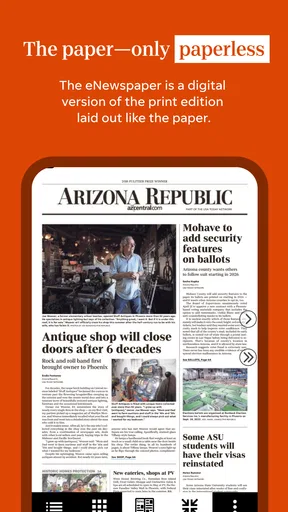



 Analysis by AppCompare
When I want to understand what is happening around Arizona without opening a pile of news apps, I look for a source that can bring local reporting into the same reading routine as broader headlines. AZ Central: Arizona Republic is built for that kind of habit: it is a free news and magazines app from USA TODAY Co., with a distinctly Arizona focus. I find that local emphasis useful when a national headline needs context closer to home, though it matters most to readers who actually follow the state.
Choosing it as a daily starting point
The first practical question is whether you want an Arizona-centered news feed or a general-purpose aggregator. I would reach for this app when local developments, community coverage, and state news deserve more attention than whatever is trending nationally. Its store summary also points to photography and video, so the experience is not limited to scanning text headlines. That makes it a sensible option for a short morning check-in, or for returning to a story when I have more time to look at its visuals.
It is less compelling if your main goal is to compare many publishers in one neutral feed. A broad news aggregator is usually better for that, while a national newspaper app may offer a wider view of events beyond Arizona. I see AZ Central as a focused source rather than a replacement for every other outlet: it can anchor a local routine, but readers who rarely need Arizona coverage may not get enough value from that focus.
From opening the feed to deciding what matters
My preferred workflow is simple: open the app when I have a few minutes, scan for a local story that affects my day, and save the longer reading for a quieter moment. The useful distinction is between a headline that is merely interesting and one that changes a practical decision, such as what to follow in the community or how to understand a state-level issue. Having local coverage close at hand can reduce the urge to search the same topic across several sites.
For example, imagine checking the news before leaving home and spotting a developing local story. I would read enough to learn what is known, then return later rather than treating one quick glance as the whole picture. Video and photography can add useful context, especially for an event or place, but they should support the reporting rather than replace reading the details. That small habit helps me avoid drawing a firm conclusion from a headline or a visual alone.
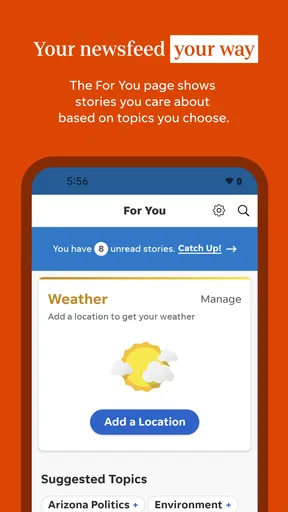
Personalization can make that routine more manageable. The published app description does not establish exactly how every preference behaves, so I would treat any topic selection as a way to guide attention, not a guarantee that the feed will contain only those subjects. A practical tip is to check the mix after using the app for a while: if the feed feels too narrow, broaden your interests; if it feels noisy, be more selective. That is a better approach than expecting a customized feed to make every editorial choice for you.
How the content travels beyond the screen
News reading often involves a handoff: a quick scan on a phone, a conversation with someone else, and then a return to the story when there is time. Here, the local focus can make that handoff worthwhile. A report about an Arizona issue is easier to discuss with neighbors or family when the source is already part of your routine, and rich visual material can help explain why a story matters to someone who has not been following it.
Worth Reading Before You Choose

EA SPORTS FC Mobile 26 Is a Bigger Football Game, but It Takes Time

Flipboard Shows What News Apps Must Do Beyond the Feed

Switching to Android Auto Means Rethinking Your Driving Routine

Google Calendar Makes a Crowded Week Easier to Manage

Ludo King Makes the Most of the Minutes Between Plans

Baby Panda World Brings Quick Play to Modern Phones, but Its Game Library Feels Busy
I would still keep the distinction between sharing a story and verifying a claim. For a consequential decision, I would read the full article and check whether the detail I care about is actually addressed, rather than passing along a notification or headline as a complete account. This is especially useful with fast-moving news, where an early update can be less complete than later coverage. The app can make local reporting easier to encounter; careful reading remains the reader’s job.
There is also a useful trade-off between a single-source habit and a multi-source one. Staying with a local publication saves time and gives a consistent point of entry, but it narrows the range of editorial perspectives in your daily routine. I would use AZ Central for the Arizona angle and consult another reputable outlet when I need broader national context, an independent comparison, or more depth on a topic outside its natural focus. That combination is more realistic than expecting one app to cover every need equally well.
Who is likely to get the most from it
This app makes the most sense for Arizona residents, people with family or work ties to the state, and readers who want local stories alongside national coverage. It can also suit someone who does not want to build a complicated news setup: one focused app can be a straightforward place to begin the day. If you are only an occasional reader, the free price lowers the barrier to trying it, although in-app purchases are listed from $19.99 to $69.99 per item. I would check the purchase terms in the app before committing to anything paid.
On the other hand, I would skip it if you want a strictly international perspective, a feed assembled from many publishers, or a source centered on a different region. It is also not the right fit for someone who dislikes publication-specific apps or expects every story to be available without any paid options. The age rating is Everyone 10+, which is worth keeping in mind when choosing news access for a younger reader; adults should still use their own judgment about which stories are appropriate.
At a glance, the app has a 2.4 average from around 1,100 ratings, with 479 written reviews, and more than 100,000 installs. Those figures suggest a product that has reached a meaningful audience but has also drawn mixed reactions. I would not use the rating alone to decide: the better test is whether its Arizona reporting, presentation, and any purchase requirements fit your own routine. It was released on March 11, 2014, and version 8.7.1 requires iOS 8.0 or later, so checking compatibility on your particular device is a sensible first step.
Getting Started with the App
Downloading the AZ Central: Arizona Republic app was a breeze. It's available on both Android and iOS, so no matter what device you have, you're covered. Once installed, you're greeted with a clean and inviting interface. I was pleased to see how intuitive the layout is. Everything is where you'd expect it to be, making navigation a cinch.
Setting up your preferences is simple. The app allows you to tailor your news feed to your interests, whether it's sports, politics, or local events. I found the customization feature particularly handy because it meant I could skip the noise and focus on what matters to me.
Diving into the Content
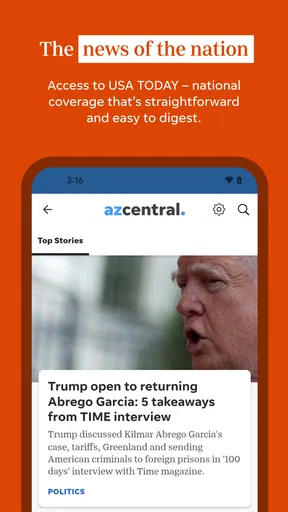
What stood out to me about this app is the sheer volume and quality of content it offers. The articles are well-written, engaging, and cover a broad spectrum of topics. Whether you’re interested in the latest political developments or local community stories, there's something for everyone.
One of my favorite features is the multimedia integration. The app doesn’t just give you text-based articles. It includes videos, photo galleries, and even interactive graphics that add depth to the stories. Watching a video about a local festival while reading an article about it really brought the experience to life for me.
Stay Updated with Notifications
Now, I’ll admit, I was a bit wary about enabling notifications at first. I didn't want to be bombarded with alerts every five minutes. But, the app does a fantastic job of sending timely notifications that are actually relevant. You can adjust the frequency and type of notifications you receive, which I found to be a game-changer.
For instance, if you’re a sports fan, you can opt to receive live updates on your favorite teams. This feature kept me in the loop during a recent Cardinals game, and I didn’t miss a beat.
User Experience and Design
Let’s talk about the user experience for a second. The design is sleek and modern, with an emphasis on readability. The font size is just right, and the contrast between text and background makes for easy reading. I also appreciate the night mode feature, which is a lifesaver for late-night news binges.
The app is responsive and fast, with minimal load times. Whether you're on Wi-Fi or mobile data, the performance remains consistent. There’s something incredibly satisfying about an app that just works smoothly, without any hiccups.
Additional Features Worth Mentioning
Beyond the news, the app offers several additional features that enrich the user experience. The weather section is quite handy, giving real-time updates and forecasts. I found it useful to have weather alerts alongside my news feed, especially during monsoon season.
There’s also a section dedicated to classifieds, which might come in handy if you're looking to buy or sell items locally. I haven't used this feature extensively, but it seems like a convenient addition for those interested.
Final Thoughts
All in all, AZ Central: Arizona Republic is a solid app for anyone wanting to keep their finger on the pulse of Arizona. The combination of comprehensive content, personalized features, and a user-friendly interface makes it a top choice for news junkies and casual readers alike.
If you’re tired of chasing down the latest headlines from multiple sources, give this app a try. It's like having all of Arizona in the palm of your hand, and it doesn’t get much better than that. Trust me, it's worth the download.
Pros
- Comprehensive local news coverage.
- User-friendly interface and navigation.
- Customizable news alerts.
- High-quality multimedia content.
- Regular updates with breaking news.
Cons
- Limited access without subscription.
- Occasional app crashes reported.
- Ads can be intrusive at times.
- Offline mode is limited.
- Some features require high data usage.
FAQs for AZ Central: Arizona Republic
What is AZ Central: Arizona Republic app used for?
AZ Central: Arizona Republic app provides users with comprehensive news coverage, including local, national, and international stories. It offers articles, videos, and live updates on various topics such as politics, sports, and entertainment, making it a go-to source for staying informed about Arizona and beyond.
Is the AZ Central app free to use?
The AZ Central app is free to download, and it offers a selection of content at no charge. However, to access premium articles and exclusive content, users may need to subscribe to a paid plan. This ensures full access to all features and the latest in-depth news coverage.
Does the app allow for personalized news feeds?
Yes, the AZ Central app offers personalized news feeds. Users can customize their experience by selecting topics of interest, ensuring that the most relevant news is delivered directly to them. This feature enhances user engagement by tailoring content to individual preferences.
How frequently is the content updated on the AZ Central app?
Content on the AZ Central app is updated constantly throughout the day. Users receive real-time news updates and notifications, ensuring they are always informed about the latest developments. This continuous update cycle is crucial for those who rely on timely news delivery.
Can I access the AZ Central app offline?
While the AZ Central app primarily requires an internet connection for the latest updates, it does offer some offline capabilities. Users can save articles for offline reading, allowing them to access important content even without a network connection, making it convenient for on-the-go reading.


